
State Records Retention
State Records Retention
As a state agency, George Mason University must abide by all Library of Virginia (LVA) records management policies and procedures to meet regulatory and compliance requirements. This quick guide outlines the search process for the LVA General Schedules for State Agencies Database.
-
Access the database.
Use the lva.virginia.gov link or navigate there directly, then:
- Scroll down and select For Localities and State Agencies
- Select Records Management
- Select Retention Schedules
- Select General Schedules for State Agencies
- Select Searchable database for state General Schedules
-
Narrow by schedule type (if known).
Choose a schedule from the dropdown menu. The most commonly used general schedules at George Mason are GS-102: Fiscal Records, GS-103: Personnel Records, and GS-111: College and University.
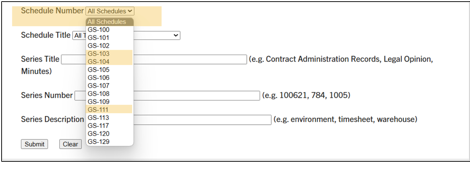
General Schedule Selector page -
Search by series description (if schedule is unknown).
Use the series description search feature. Avoid complex words or punctuation.
-
Common document types.
Common document types for Mason employees include fiscal records (e.g., search "purchase orders"), grant records, and personnel records (e.g., search "hire," "recruit," or "employee").
For help with more complicated document types, visit the University Records Management website or reach out at recmgt@gmu.edu.

This tutorial by The Teaching & Learning Team is licensed under a Creative Commons Attribution 4.0 International License.